The Linux Luminarium: Learning Linux by Leveraging Lightweight Labs and Ludicrous Lessons
Yan Shoshitaishvili Arizona State University USA yans@asu.edu
Adam Doupé Arizona State University USA doupe@asu.edu
Connor Nelson Arizona State University USA connor.d.nelson@asu.edu
Abstract
Learning Linux typically demands initial setup overhead, creating a paradox where newcomers must already somewhat understand Linux environments to effectively learn about them. To address this challenge, we developed an online interactive learning curriculum explicitly designed to eliminate the barrier of manual setup. Our approach divides core Linux concepts into small, focused challenges, enabling incremental mastery through active practice. Beyond traditional exercises, we introduce intentionally playful and even destructive scenarios, such as compromising security, deploying forkbombs, and executing "doomsday" commands like rm -rf / to solidify understanding through memorable experiences. These "shenanigan" challenges not only reinforce technical skills but instill the system consequences of mismanagement, highlighting the flexibility, power, and potential pitfalls of Linux environments in an engaging, experiential manner.
CCS Concepts
• Applied computing → Education; Interactive learning environments.
Keywords
Linux Education, Tutoring
ACM Reference Format:
Yan Shoshitaishvili, Adam Doupé, and Connor Nelson. 2026. The Linux Luminarium: Learning Linux by Leveraging Lightweight Labs and Ludicrous Lessons. In Proceedings of the 57th ACM Technical Symposium on Computer Science Education V.1 (SIGCSE TS 2026), February 18–21, 2026, St. Louis, MO, USA. ACM, New York, NY, USA, 7 pages. https://doi.org/10.1145/3770762. 3772655
1 Introduction
A journey of a thousand miles begins with a single step, and journeys in Computer Science Education must often start with the basics of a computer environment. The choice of environment varies across educational institutions: some standardize on Windows, others on Linux, and some adopt emerging web technologies to obviate the need for students to be proficient with an operating system at all.
Large swaths of the Computer Science curriculum at our university expect Linux knowledge from the students, but until this

This work is licensed under a Creative Commons Attribution 4.0 International License. SIGCSE TS 2026, St. Louis, MO, USA
© 2026 Copyright held by the owner/author(s). ACM ISBN 979-8-4007-2256-1/26/02 https://doi.org/10.1145/3770762.3772655
work, our curriculum had no actual Linux education. The lack of a structured Linux curriculum hampered students throughout their entire Computer Science journey [12] and increased load on the instructional staff as surprisingly elementary gaps in student understanding made themselves apparent distressingly late in the curriculum.
This paper describes the novel platform that we developed to solve this problem: the Linux Luminarium. Inspired by the emergence of a new paradigm in cybersecurity education [17] in 2024, we developed the Linux Luminarium as a turnkey (e.g., no setup required), structured, challenge-based learning resource. The Linux Luminarium comprises 108 challenges spread across 15 topical sub-modules, spanning from initial introductions of the concept of a command line all the way to relatively advanced challenges exploring the Linux security model.
To maximize its utility in learning, the Linux Luminarium introduces several novel features not seen in other Linux education platforms, including intensive shell instrumentation to give learners in-band guidance and feedback, mechanisms to anticipate, detect, and correct learner errors in real-time before frustration can build, and challenge randomization to support repeated exploration of Linux concepts.
We opened Linux Luminarium to the public on May 1, 2024, and as of July 1, 2025 have educated 15,394 learners (both at our University and beyond) through a cumulative 697,553 successful challenge solves. We also deployed Linux Luminarium as a module in a required Junior-year course in Computer Science at our large R1 public University, anecdotally observing a significant reduction in downstream learner issues involving Linux.
To evaluate the Linux Luminarium's efficacy in education, we carried out two surveys (both evaluated by our institution's IRB and determined to be Exempt), one gathering feedback from 47 learners from outside of our University and one surveying 405 of our Junioryear students. Both surveys show that the Linux Luminarium is an effective teaching tool, addressing issues that frustrated learners' pre-Linux Luminarium attempts at learning Linux and improving their Linux knowledge. Furthermore, the results show that our innovations, in particular, help make this possible.
Our goal is for the Linux Luminarium to become a de-facto platform for Linux-curious learners around the world to get started on their computing journey. To this end, the Linux Luminarium is not only freely available to access for anyone, but also open source, along with all platform components, enabling ongoing research and development by the community.
2 Design
Several goals drove our creation of the Linux Luminarium:
Minimal device requirements. We aimed to be accessible to people of diverse backgrounds, including those without regular access to a development- or virtualization-capable computer.
Minimal prerequisites. Ideally, learners would be able to approach the Linux Luminarium with minimal technical knowledge (e.g., just understanding how to use a web browser). We explicitly aimed to avoid assuming that users understood file systems, processes, source code, executables, and almost everything else.
Minimal conceptual leaps. Given the lack of familiarity with the concept, we strove to decompose the Linux learning problem into a series of tiny steps that build up to significant knowledge.
Guardrails. As experienced educators, we have observed a staggering number of ways that learners can misguide themselves. We attempted to create an environment in which learners had freedom to explore while minimizing the chance of learning-derailing mistakes.
Engagement. We aimed to keep learners motivated through regular positive feedback reinforcement and community involvement.
With these goals in mind, we chose our pwn.college DOJO platform [17] for the Linux Luminarium's infrastructure. The DOJO provides an open-source, web-accessible Linux environment in which instructors can implement assignments, exposes advanced instrumentation for instructor use, and makes security guarantees that maintain educational integrity of assignments in the face of too-clever students. We adopted the Capture-the-Flag-inspired PWN philosophy [18], which envisions using hands-on challenges, that gradually increase in complexity, to teach successive "microconcepts". For this, we broke concepts into micro-components and conveyed each component through an individual, small challenge that, in aggregate with other challenges, gradually builds up understanding of the concept. We augmented this platform and philosophy with a number of innovations specific to first-stage Linux education and implemented an extensive curriculum, all described below.
2.1 Instrumented Learning
The DOJO platform gives assignment authors significant control over the learner's web-accessible working environment. We used this flexibility to implement a number of novel instrumentation hooks that serve as our guardrails to improve student learning.
Challenge randomization. DOJO exposes an interface for running setup code when a learner launches a challenge. We use this in a large number of places in the Linux Luminarium, such as randomizing the location of files that learners must find (e.g., to learn the find command), data to filter (to practice grep), and so on.
We use two different forms of randomization: per-attempt (using a pseudorandom number generator) and per-learner (achieved by hashing the /flag file, which is stable per learner-challenge tuple), depending on the specific challenge. The latter allows us to differentiate challenges between learners to minimize the spread of written solutions (which reduce active learning to passive learning), while the former increases challenge variety in general.
Shell instrumentation. We expanded the DOJO platform (and upstreamed the resulting contribution) to enable hooking of a learner's .bashrc, allowing our challenges to customize learner shell sessions.
We use this, combined with bash's rich debug capabilities, to enable significant observability for the challenge of the learner's attempts to solve it. For example, when teaching paths and the cd command, we can directly detect (by tracking the PWD environment variable) when a learner enters the correct directory. Furthermore, by hooking each line entered into the shell, we can ensure that learners properly use absolute paths (in challenges that aim to teach them) versus relative paths (when the curriculum moves on to that) or properly use file globbing, tab completion, and so on as these concepts are taught.
Command hooking. We use the aforementioned shell instrumentation to set the learner's PATH environment variable to allow challenges to easily override commands, letting us inject guardrails and feedback into the commands themselves.
For example, when we teach advanced usage of the tee command, our tee wrapper actually inspects the arguments to determine whether the learner is on the right path.
Error anticipation. We have observed learners making a large number of mistakes when learning Linux. A common example is case sensitivity: learners unfamiliar with Computer Science might not understand that files and shell variables are case-sensitive. A combination of our shell introspection, command hooking, and mistake prediction allows us to preempt many of these errors.
For example, a challenge that asks the learner to use cat to read the /flag file would also include a /FLAG file with content informing the learner of the casing mistake, a CAT command doing the same, a flag command explaining that the command they want is cat, and a shell hook detecting the errant attempt to execute the /flag file directly. Likewise, when teaching how to set environment variables (e.g., NAME=VALUE), we include a VALUE command (to catch the case where the learner does NAME= VALUE) and a NAME command (to catch NAME = VALUE).
Naturally, predicting all such errors is impossible. To remedy this, we monitor interactions with our environment and voiced student frustrations on our online Discord community. As we notice common mistakes made by learners, we augment the error anticipation logic to catch these mistakes as well.
Integrity and robustness. Our curriculum involves some securityrelevant concepts and, once users learn these concepts, it becomes difficult to prevent them from finding unintended solutions (and thus potentially missing the pedagogical point of the challenge). We expanded DOJO to try to head off such solutions. For example, we use bash's debug capabilities to hook and immediately terminate subshells, as so:
trap '[[ $BASH_SUBSHELL -gt 0 ]] && exit' DEBUG
2.2 Capturing Flags
The DOJO platform is inspired by "Capture The Flag" (CTF) competitions, which are typically live cybersecurity events in which participants must exploit hacking challenges (e.g., by exploiting them) to retrieve a cryptographic "flag" token and submit it for
points. These events are very popular in the cybersecurity community, and have been observed to be effective tools in the educator's toolbox [7, 11, 14, 16, 18, 28].
Each challenge is essentially equivalent to an auto-grading script that implicitly checks a learner's solution (whether actively, such as checking if the learner has cded into a specified directory, or passively, by being written in a way that the user can only retrieve the flag by solving the challenge). In an example of the former, the first time paths are taught, the Linux Luminarium instruments the shell to detect when a learner enters the correct directory, at which point it prints the flag. For the latter, when we teach the chmod command for changing file permissions, the learner must chmod the flag file to read the flag.
In the pwn.college DOJO, these flags are tracked and aggregated as the learner's score, motivating learners to keep pushing the boundaries of their knowledge.
2.3 The Curriculum
Our application of the PWN philosophy to Linux education resulted in 108 challenges across 15 sub-modules. Each sub-module consists of 3 to 13 challenges, and each challenge explores one micro-concept, building up in aggregate to imbue the learner with Linux knowledge.
Our curriculum starts out with challenges that use a heavilyinstrumented shell session to explain the concept of Linux commands and arguments from a syntactic perspective (e.g., having the user run toy commands for practice). The next module introduces the Linux filesystem and the cd command to explore it. Each type of path (absolute paths, "naked" (no ./) and non-naked relative paths), is explored in its own challenge or series of challenges, minimizing the concepts conveyed per challenge. The next module explores a number of commands to help the learner start actually using the command line (ls, etc.). Then the Linux Luminarium covers the reading and search of documentation (using functionality of man, help, and –help flags). After this, we cover a series of increasingly complex topics such as file globbing, piping, setting and reading shell variables, and manipulating data. Then aspects of the Linux operating system itself are introduced: processes, permissions, users, and scripts. Finally, the curriculum ends on a series of culminating experiences, described below.
The PWN philosophy suggests that approaching concepts from an adversarial/security mindset enables unique insights into those concepts [18]. We struggled adopting this part of the philosophy for much of the Linux Luminarium, as the concepts were simply too introductory to even discuss security. However, toward the end of the curriculum, after covering the topics described above, opportunities begin to arise, and we are able to use a series of security challenges to reinforce the concepts we'd previously taught. Specifically, these are:
Cracking account passwords. To drive home the concept of users and permissions, we have a series of challenges where learners must crack passwords of users created by the challenge. This is a fairly standard part of a Linux security curriculum but sets the stage for more advanced challenges.
PATH hijack. To convey how Linux finds programs to invoke, we teach about the PATH variable and have the user practice its hijacking to override common utilities and gain control of program execution (to retrieve the /flag file).
.bashrc hijack. To explore implications of incorrect file permissions, we have a series of challenges in which learners can hijack other user accounts by exploiting unsafe permissions to hijack the victim user's .bashrc. This explores, through several challenges, bad file (.bashrc) permissions, the implications of unsafe directory permissions (e.g., world-writable home directory), and the effects of unsafe handling of symbolic links. We observed, and learners reported, that this improved both understanding of and passion for the material.
Linux destruction. Mistakes, though we try to minimize them throughout the rest of the Linux Luminarium, are often the best teacher. Most Linux veterans have, at some point, deleted something they did not mean to, overwhelmed their machine with errant processes, and so on. Observing the teaching potential of this, we created a series of challenges at the end of the curriculum in which learners intentionally carry out these "mistakes" to destroy their environment in various ways: rm -rf /, a fork bomb, and filling the disk.
3 Related Work
Linux Luminarium is not the first attempt to create a platform via which to teach Linux: other approaches have been proposed and implemented by educators and enthusiasts alike. These Linux education resources fall into two categories: interactive and noninteractive. A plethora of non-interactive resources have been developed to teach Linux. These take the form of organized lessons [21], textbooks [8, 13], video collections, and countless Massive Open Online Courses (MOOCs). All of these tend to take the form of video or text lessons with suggested concepts for the learner to practice (e.g., "make a file and then find it using the find command"), lacking the structured feedback of Linux Luminarium.
Interactive resources can be further split into offline and online styles. In the former, the learner is presented with a virtual machine to download or install, or assumed to already have a Linux environment, and is encouraged to practice learned concepts in that VM [1, 4, 9, 25]. Unfortunately, this is suboptimal for two reasons. First, it presents a sort of chicken-and-egg problem: learners are assumed to be proficient enough in computing to install virtual machines, and in cases where they are not, cannot undertake the lesson. Second, the possibility of instructor instrumentation and measurement of success are extremely limited, a reason that, beyond first-stage Linux education, has recently driven education platforms online [17].
Online platforms benefit from ease of access, but are complex to implement for instructors and platform developers. A number of browser-accessible Linux environments have been created for non-educational purposes, typically as tech demos [3, 10], for use in software development [20, 23], or for later-stage education [5, 6, 15, 17, 26, 27]. Several have been created to enable direct practice of Linux concepts through a learner's browser. This property is shared with Linux Luminarium, though the specifics of our pedagogical approach and materials differ.
OverTheWire Bandit [19] implements a Linux learning platform through a network-accessible virtual machine. Learners use a Secure Shell (SSH) client to connect and tackle challenges, with successful completion of a challenge culminating in the password for the next level. Bandit lacks both the turnkey access (requiring learners to set up SSH) and instrumented challenge feedback features of Linux Luminarium, and as a result its challenges take very large leaps: the very basics of commandline usage span fewer than 10 challenges, throwing learners into the thick of things quickly.
linuxzoo [22] provides GUI and Command-Line access to studentdedicated Virtual Machines via the browser. Unlike Linux Luminarium, linuxzoo's grading is done "on-demand": when a learner achieves the goal of a lesson, they click the Check button to have the grading system check the state of the VM. This limits linuxzoo to less granular lessons, typically requiring external reading material to fill knowledge gaps, rather than the micro-concept approach of the Linux Luminarium.
Webminal [29] provides a web-accessible Linux terminal backed by a dedicated Linux instance and pairs this with community support to help overcome hurdles. Unlike Linux Luminarium, Webminal focuses on example-based learning: the learner is typically told what to execute and explained what the results mean, with the actual interaction mostly carried out to duplicate the lesson contents. As shown by our survey, the challenge-based nature of the Linux Luminarium is a critical part of learning.
uAssign [2] proposed a containerized, web-accessible Linux terminal for Linux education. The authors focus predominantly on scalability and integration, and other than supporting parameterized randomization, do not discuss the design of the educational material itself, which is not available online. To the best of our knowledge, uAssign does not explore the granular lessons or the instrumented challenge feedback enabled by the Linux Luminarium.
TermAdventure [24] is a learner-hosted technique that instruments a shell session to turn their sessions into a text adventure game, letting them learn in the course of completing the game. The authors have open-sourced the core code of the tool, but not the implemented levels of the game, making it difficult to assess what level of instrumentation, beyond the directory-changing detection described in the paper, is possible. Conversely, the Linux Luminarium is centrally-hosted (and turnkey-accessible), supports extensive instrumentation, and provides open curricula for teaching most concepts in early Linux learning.
Finally, the Linux Luminarium far from the first CTF-inspired education platform [7, 11, 14, 16, 18, 28], but it is the first combining its unique features to enable seamless learning of Linux for learners around the world.
4 Impact and Results
We opened the Linux Luminarium to the world on May 1, 2024, relying on word of mouth to spread awareness. We have continued to add new challenges exploring new concepts over time, resulting in 108 challenges across 15 sub-modules.
The usage has gradually increased over time. Until this paper's data cutoff of July 1, 2025, a total of 15,394 have solved 697,553 challenges, with June 2025 seeing 55,363 solves by 1,946 learners.
To understand the impact of Linux Luminarium on learners, we carried out two surveys1 : one for students at our University, where we use the Linux Luminarium as a Linux primer for Computer Science majors (mostly in their Junior year) and another for learners from around the United States, beyond our university. Our surveys included both Likert scale and free response questions. All questions in both surveys were optional.
In analyzing the survey data, we identified a number of takeaways that demonstrate the strengths, impact, and weaknesses of the Linux Luminarium, which we detail below.
4.1 Learners Beyond our University
We also sent out a survey to learners who were not students at our university and had engaged with the Linux Luminarium within the last two months (so that their experience would be fresh in their memory). Our IRB protocol limited us to respondents who resided in the United States and were not students at our University. Over 60% of global Linux Luminarium users reside outside of the United States, limiting our qualified respondents to 47.
In total, 47 learners responded to our survey. Of these, 1 was a high school student2 , 14 were undergraduate students, 8 were graduate students, and 1 was in a vocational program, and 23 were professionals.
Our survey included a number of Likert questions, which we show (along with aggregated responses) in Figure 1. Additionally, we asked them to (retroactively) rate their comfort level with certain Linux concepts before and after their participation in the Linux Luminarium. Finally, we asked free-response questions about their biggest hurdles in learning Linux prior to the Linux Luminarium and the biggest hurdle they faced in the Linux Luminarium. We synthesize the results below.
There is a value in structured learning resources. In free-form responses, the most common observation (11 responses) of the biggest hurdle in attempts to learn Linux prior to the Linux Luminarium was the lack of structure in existing Linux Learning resources. None of these learners reported the same hurdle for the Linux Luminarium itself, reflecting the success of the structured approach we take to Linux education.
A turnkey, interactive Linux environment enables learning. About half of our learners reported being hampered in prior attempts at learning Linux by a lack of a readily-available Linux environment, with the other half disagreeing (Q1). 7 learners mentioned this as their top hurdle in free-response questions. In freeform responses, the two most common reasons for having been hampered by the lack of available interactive environments were an uncertainty about how to set up a system for learning and a fear of accidentally destroying it with an errant command once set up.
Despite half of the respondents disagreeing with Q1, Q2 shows overwhelming agreement that the Linux Luminarium's web interface helped learners start learning Linux.
1We reviewed the surveys with our institutions IRB and received an Exempt determination for both.
2Our study clarified that participants must be 18 years or older.
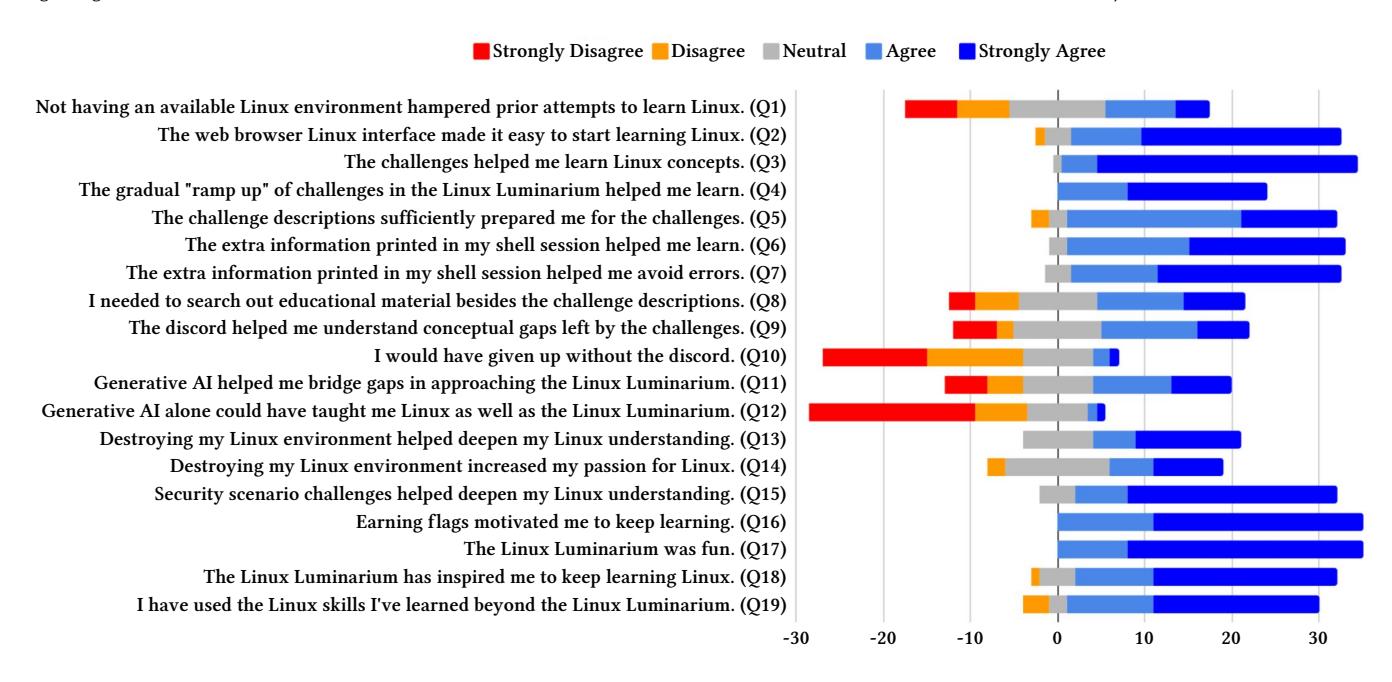
Figure 1: Likert survey questions and their responses by learners beyond our University. A total of 47 students completed the survey. All questions were optional.
The gamified, challenge-based curriculum is beneficial for both learning and motivation. Learners reacted overwhelmingly positively both to the use of hands-on challenges in learning (Q3) and the use of Capture The Flag-style "flags" as additional motivation to solve these challenges (Q15). No respondents disagreed with either statement, and agreed that the Linux Luminarium was enjoyable (Q16) and inspiring for further learning (Q17). While this motivational effect has long been observed in CTFs [7, 11, 14, 16, 18, 28], we hope that reproducing this finding in even-earlier-stage education settings will be useful to future educators.
5 free-form responses listed the lack of available challenge problems as the top hurdle in their pre-Linux Luminarium attempts to learn Linux.
Guidance is good, but not perfect. Learners overwhelmingly reported that challenge descriptions equipped them to approach the challenges (Q4), but most still needed to search out additional (off-site) materials beyond these descriptions (Q7). Additionally, in free-form responses, 7 learners reported vague, confusing, rambling, or incomplete problem descriptions as their biggest hurdle in approaching the Linux Luminarium.
Beyond online documentation, modern learners also use additional interactive guidance via online communities (e.g., on learningdedicated Discord channels such as the one we created for Linux Luminarium) or Generative AI (e.g., ChatGPT). We asked several questions to measure the impact of these resources. Students reported similar positive impact (more of them agreeing than disagreeing) for both Discord (Q8) and AI (Q10), but disagreed with both the assertion that the Discord help was critical (Q9) and that Generative AI could replace the Linux Luminarium as a sole Linux learning resource (Q11).
Instrumented correction and guidance text helps learners
learn. The Linux Luminarium's shell session instrumentation was extremely helpful, with no respondents to Q5 (for learning) and Q6 (for avoiding errors) disagreeing and almost universal agreement. As Linux Luminarium is the only platform that provides this feature, this points to its usefulness as a first-stage Linux learning platform.
Destruction can be constructive. While both Destructive (Q12) and Security (Q14) challenges improved understanding of Linux concepts, the Security challenges appeared to be more useful. Typically, the Security challenges involve the combination of more Linux concepts (e.g., data processing to brute force a password and the Linux user/group model) than Destructive challenges (e.g., rm -rf /), so this makes sense, though we were pleased to see that the latter remains useful as well.
The Linux Luminarium increases learner comfort with Linux.
We asked respondents to retroactively self-assess their comfort levels with different aspects of Linux as they were before starting and after completing the Linux Luminarium, on a scale from 0 (Very Little Comfort) to 4 (Very High Comfort). The results are presented in Figure 2. Participants spanned the whole range of assessments, with the median assessment in each category being Moderate familiarity (2). Participants reported median improvements between 0.7 (for the GUI, which learners only incidentally use to access the material) to 1.3 (for the Security Model, which we explicitly cover with the material).
Threat to Validity: since both estimations are retrospective (e.g., learners estimate their pre-Linux Luminarium knowledge after completing the Linux Luminarium), learners might subconsciously underestimate their Before knowledge or inflate the delta between Before and After because of a biased perception of self-improvement.
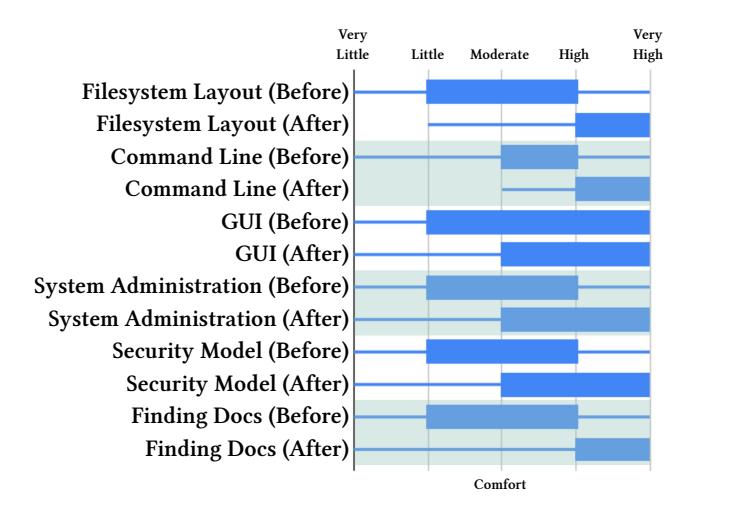
Figure 2: Horizontal candlestick plot of self-assessed comfort levels with different areas/concepts of Linux among learners beyond our University on a scale from 0 (Very Little Comfort) to 4 (Very High Comfort). Both the Before (starting the Linux Luminarium) and After (completing the Linux Luminarium) self-assessments were performed retroactively. Participants reported median improvements between 0.7 (for the GUI, which students only incidentally use during their learning) to 1.3 (for the Security Model, which we explicitly cover).
Ideally, we would survey the users before they access the Linux Luminarium, but this is not something that our platform currently supports. Regardless, we present this part of our data for completeness.
4.2 Learners at our University
The Linux Luminarium is a required module during the Introduction to Cybersecurity course at our large R1 public University. At the conclusion of every module, including the Linux Luminarium, we invited students to complete a survey about their experience with the material. Because these surveys exist after each module, they are not Linux-specific, and so are structured differently than the survey discussed earlier. Of the 658 students in the class, 405 filled out the survey and consented to be included in this study3 .
Students reported working an average of 11.23 hours to complete the module. Additionally, students overwhelmingly agreed that the Linux Luminarium was Educational (388 agreeing vs 27 disagreeing), Enjoyable (388 vs 49), and Engaging (360 vs 37), and that the challenge descriptions helped students learn the material (322 vs 24).
In free-form responses, students listed as positives, from most frequently listed to least frequently listed, the following:
- The CTF-style challenge gamification.
- Gradual, step-by-step challenges that keep learners engaged and reinforce concepts.
-
Increased comfort with Linux over the course of the module.
- Available help from Discord, Generative AI, and shell instrumentation to fill the gaps left by the challenge descriptions.
- The quality of the challenge descriptions themselves.
- The ease of web accessibility of the Linux Luminarium environment.
The negatives, from most frequently listed to least frequently listed (omitting course-specific feedback such as Canvas organization, etc.), were:
- Vague, confusing, rambling, or incomplete challenge descriptions.
- Residual hard-to-bridge conceptual gaps between some of the challenges, with data piping (between processes), file globbing, symbolic links, and the security implications of the PATH environment variable specifically mentioned.
- Overly-repetitive challenge ramps (e.g., too much practice for concepts such as chmod).
Anecdotally, we found that the introduction of the Linux Luminarium during the 2024-2025 academic year drastically improved student understanding of Linux throughout the rest of the course. Whereas prior iterations of this course would receive introductory questions from students (e.g., about the Linux filesystem layout, the Linux process model, etc.), we observed almost no such questions in either semester that included the Linux Luminarium.
4.3 Community Involvement
Because the Linux Luminarium is openly available and open source, and the material is intentionally very introductory, passionate learners are able to contribute to the project. Over the roughly 14 months of its availability, we have received contributions from 15 distinct individuals from the global community. These contributions ranged from spelling and grammar fixes to entire sub-modules of content. For example, the Linux Luminarium's file permissions module was initially contributed by a community member.
5 Conclusion
The Linux Luminarium is a novel, turnkey, challenge-based Linux education platform that supercharges learners to become proficient Linux users. Over the year of its open availability, the Linux Luminarium has taught Linux to 15,394 learners, shepherding them through solving 697,553 challenges. By surveying learners around the country as well as at our University, we show that the Linux Luminarium, and the techniques that underpin it, successfully drive student learning. The Linux Luminarium is both openly available on the internet for turnkey learning and open source to enable reproducibility, learning, and ongoing research.
Acknowledgements. This material is based upon work supported by the Defense Advanced Research Projects Agency (DARPA) under Contract No. HR001124C0362 and by the Department of Navy under award N00014-23-1-2563 issued by the Office of Naval Research. Any opinions, findings, and conclusions or recommendations expressed in this material are those of the author(s) and do not necessarily reflect the views of the Defense Advanced Research Projects Agency (DARPA) or the Office of Naval Research.
3Consent or lack thereof had no impact on grades or other student metrics in the class.
References
- [1] Cisco Networking Academy. [n. d.]. Linux Unhatched. https://www.netacad. com/courses/linux-unhatched?courseLang=en-US.
- [2] Jacob Bailey and Craig Zilles. 2019. uassign: Scalable interactive activities for teaching the unix terminal. In Proceedings of the 50th ACM technical symposium on computer science education. 70–76.
- [3] Fabrice Bellard. [n. d.]. JSLinux. https://bellard.org/jslinux/.
- [4] Vincent Berry, Arnaud Castelltort, Chrysta Pelissier, Marion Rousseau, and Chouki Tibermacine. 2022. Shellonyou: Learning by doing unix command line. In Proceedings of the 27th ACM Conference on on Innovation and Technology in Computer Science Education Vol. 1. 379–385.
- [5] Razvan Beuran, Dat Tang, Cuong Pham, Ken-ichi Chinen, Yasuo Tan, and Yoichi Shinoda. 2018. Integrated framework for hands-on cybersecurity training: CyTrONE. Computers & Security 78 (2018), 43–59.
- [6] Hack The Box. 2023. https://www.hackthebox.com/.
- [7] Kevin Chung and Julian Cohen. 2014. Learning Obstacles in the Capture The Flag Model. In 2014 USENIX Summit on Gaming, Games, and Gamification in Security Education (3GSE 14).
- [8] Paul Cobbaut et al. 2007. Linux Fundamentals. Dosegljivo: http://linuxtraining. be/linuxfun. pdf.[Dostopano: 10. 2. 2019] (2007).
- [9] CodeAcademy. [n. d.]. Installing Linux Using a Virtual Machine. https://www. codecademy.com/article/installing-linux-using-a-vm.
- [10] Copy. [n. d.]. v86. https://copy.sh/v86/.
- [11] Adrian Dabrowski, Markus Kammerstetter, Eduard Thamm, Edgar Weippl, and Wolfgang Kastner. 2015. Leveraging Competitive Gamification for Sustainable Fun and Profit in Security Education. In 2015 USENIX Summit on Gaming, Games, and Gamification in Security Education (3GSE 15).
- [12] Edward Dillon, Krystal L Williams, Ashley Simone Pryor, Theodore Wimberly Jr, Mariah McMichael, Abisola Mercy Arowolaju, Donald Bernard Davis, and Toluwanimi Ayodele. 2024. Exploring the Impact of Exposing Command Line Programming to Early CS Majors (An HBCU Case Study). In 2024 ASEE Annual Conference & Exposition.
- [13] Machtelt Garrels. 2002. Introduction to Linux. A Hands on Guide. https://tldp. org/LDP/intro-linux/html (2002).
-
[14] Kees Leune and Salvatore J Petrilli Jr. 2017. Using Capture-the-Flag to Enhance the Effectiveness of Cybersecurity Education. In Proceedings of the 18th Annual Conference on Information Technology Education. 47–52.
- [15] Richard Wing Cheung Lui, Aiden Wen Yi Zhang, and Philip Tin Yun Lee. 2024. A secure and scalable virtual lab platform for computing education. International Journal of Information and Education Technology 14, 1 (2024), 59–64.
- [16] Jelena Mirkovic, Aimee Tabor, Simon Woo, and Portia Pusey. 2015. Engaging Novices in Cybersecurity Competitions: A Vision and Lessons Learned at ACM Tapia 2015. In 2015 USENIX Summit on Gaming, Games, and Gamification in Security Education (3GSE 15).
- [17] Connor Nelson and Yan Shoshitaishvili. 2024. DOJO: Applied Cybersecurity Education In The Browser. In Proceedings of the 55th ACM Technical Symposium on Computer Science Education (SIGCSE).
- [18] Connor Nelson and Yan Shoshitaishvili. 2024. PWN The Learning Curve: Education-First CTF Challenges. In Proceedings of the 55th ACM Technical Symposium on Computer Science Education (SIGCSE).
- [19] OverTheWire. [n. d.]. Bandit. https://overthewire.org/wargames/bandit/.
- [20] Bobby Powers, John Vilk, and Emery D Berger. 2017. Browsix: Bridging the gap between unix and the browser. ACM SIGPLAN Notices 52, 4 (2017), 253–266.
- [21] The Linux Journey Project. [n. d.]. Linux Journey. https://linuxjourney.com/.
- [22] Gordon Russel. [n. d.]. linuxzoo. https://linuxzoo.net/.
- [23] Rémi Sharrock, Lawrence Angrave, and Ella Hamonic. 2018. WebLinux: a scalable in-browser and client-side Linux and IDE. In Proceedings of the Fifth Annual ACM Conference on Learning at Scale. 1–2.
- [24] Marek Šuppa, Ondrej Jariabka, Adrián Matejov, and Marek Nagy. 2021. Termadventure: Interactively teaching unix command line, text adventure style. In Proceedings of the 26th ACM Conference on Innovation and Technology in Computer Science Education V. 1. 108–114.
- [25] Valdemar Švábensky, Jan Vykopal, Daniel Tovarňák, and Pavel Čeleda. 2021. ` Toolset for collecting shell commands and its application in hands-on cybersecurity training. In 2021 IEEE Frontiers in Education Conference (FIE). IEEE, 1–9.
- [26] TryHackMe. 2023. https://tryhackme.com/.
- [27] Jan Vykopal, Radek Ošlejšek, Pavel Čeleda, Martin Vizvary, and Daniel Tovarňák. 2017. KYPO Cyber Range: Design and Use Cases. In Proceedings of the 12th International Conference on Software Technologies - Volume 1: ICSOFT. SciTePress, 310–321.
- [28] Jan Vykopal, Valdemar Švábensky, and Ee-Chien Chang. 2020. Benefits and ` Pitfalls of Using Capture the Flag Games in University Courses. In Proceedings of the 51st ACM Technical Symposium on Computer Science Education. 752–758.
- [29] Webminal. [n. d.]. About. https://www.webminal.org/about/.